
Prevent every time push need password to git on Ubuntu
When working with Git on Ubuntu, sometimes you may find yourself needing to enter password or access token every time you push changes to a remote repository. This can be inconvenient and time-consuming. So, today I will show you how to configure Git to avoid this issue. There are several methods to achieve this, and I will cover the most common ones below.
- Using SSH Keys (Recommended)
- Using Git Credential Helper
Method 1: Using SSH Keys (Recommended)
This method is the most secure and recommended way to do it, as it generates a pair of cryptographic keys for authentication on your local machine and adding the public key to your Git hosting service (like GitHub, GitLab, etc.).
-
Generate SSH Key Pair
ssh-keygen -t ed25519 -C "<your_email@example.com>" -
Add SSH key to SSH agent and add private key
eval "$(ssh-agent -s)" ssh-add ~/.ssh/id_ed25519 -
Add the public key to your Git hosting service
Copy the content of your public key file and add it to your Git hosting service.
~/.ssh/id_ed25519.pub cat ~/.ssh/id_ed25519.pubFor my case is GitHub, you can follow this guide.
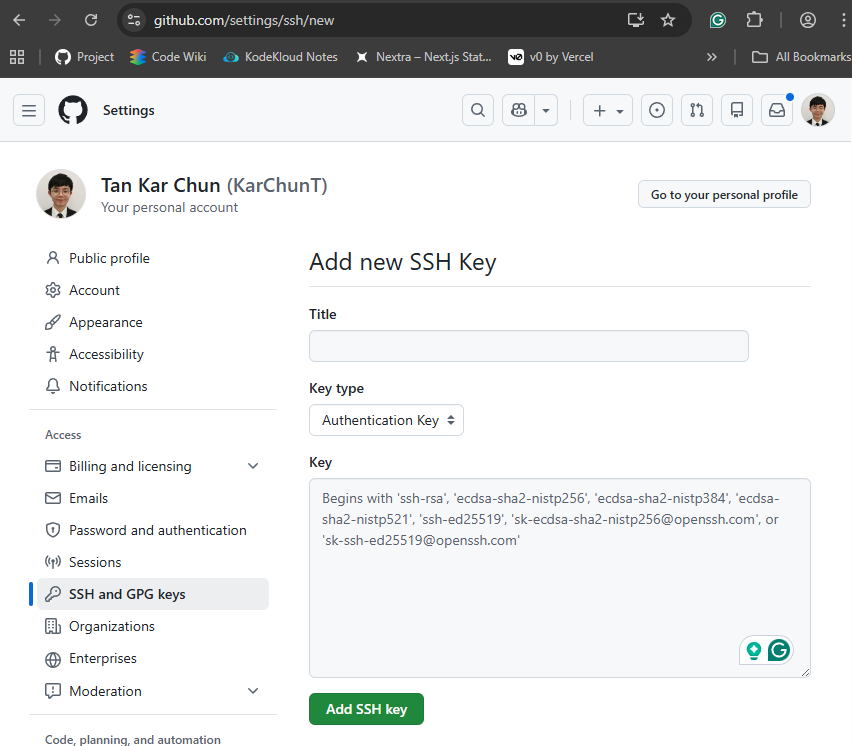
-
Change your remote URL to use SSH
git remote set-url origin git@github.com:<username>/<repository>.git
Method 2: Using Git Credential Helper
This method allows Git to store your credentials securely on your local machine, but it is less secure than using SSH keys. A credential helper will help you cache your credentials for a certain period or store them permanently depending on your configuration.
# For temporary caching (default is 15 minutes)
git config --global credential.helper cache

# Set cache timeout to 1 hour
git config --global credential.helper 'cache --timeout=3600'

# For storing credentials permanently (less secure)
git config --global credential.helper store
You can also use the Git Credential Manager (GCM) for a more secure way to manager your credentials.
sudo dpkg -i <path-to-package>
git-credential-manager configure